Accounts & Identities
The Accounts section provides a unified view of all discovered accounts across your target systems. The Identities section manages the real-world people and service owners those accounts belong to.
Accounts
Navigate to Accounts to see all discovered accounts.
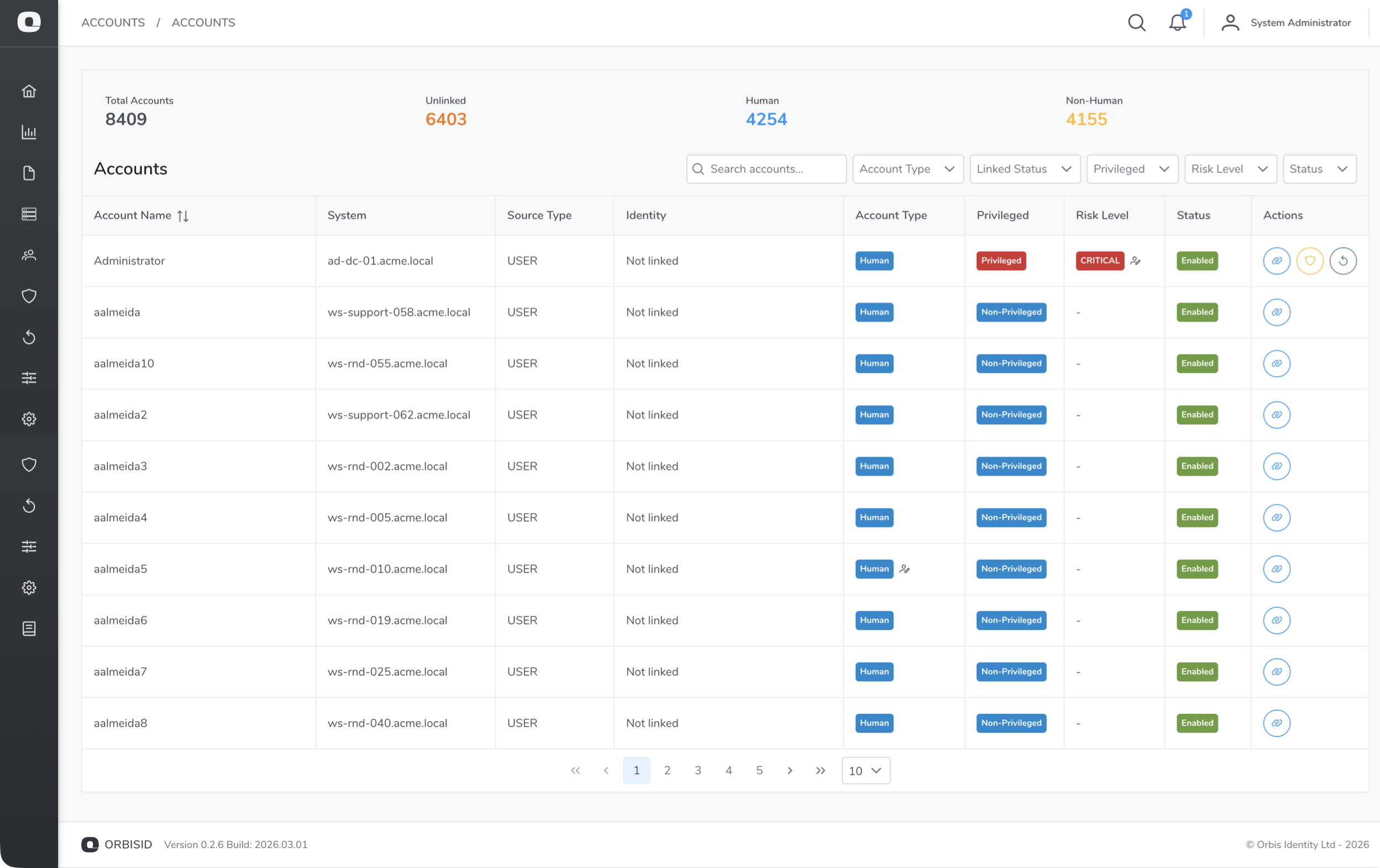
Account Statistics
The statistics bar at the top shows:
| Metric | Description |
|---|---|
| Total | All discovered accounts |
| Unlinked | Accounts not linked to any identity |
| Human | Accounts classified as human user accounts |
| Non-Human | Accounts classified as service/system accounts |
Filtering Accounts
Use the filter controls to narrow the list:
| Filter | Options | Description |
|---|---|---|
| System | Dropdown of all systems | Show accounts from a specific system |
| Account Type | Human, Non-Human | Filter by classification |
| Linked Status | Linked, Unlinked | Filter by identity link status |
| Enabled | Enabled, Disabled | Filter by account status |
Account Details
Click an account to view its full details:
| Field | Description |
|---|---|
| Username | The account name on the target system |
| Display Name | Friendly name (if available from the scan) |
| System | The target system this account belongs to |
| Account Type | Human or Non-Human (set by policy rules or manual override) |
| Privilege Level | Assigned by policy rules or manual override |
| Enabled | Whether the account is active on the target system |
| Linked Identity | The identity this account is linked to (if any) |
| Groups / Entitlements | Group memberships and permissions |
| Last Scanned | When this account was last seen in a scan |
Linking Accounts to Identities
Linking an account to an identity establishes ownership - it answers "who is responsible for this privileged account?"
- Find the account you want to link
- Click the Link icon (chain link)
- Search for an identity by name, email, or employee ID
- Select the identity and confirm
To unlink an account, click the Unlink icon on a linked account.
Bulk Linking
To link multiple accounts at once:
- Select multiple accounts using the checkboxes
- Click Bulk Link
- Search for and select the identity
- Confirm
Privilege Overrides
Policy rules automatically assign privilege levels during scans. If a rule incorrectly classifies an account, you can override it manually.
- Select an account
- Click Override Privilege (or Override Account Type)
- Select the new level and enter a reason
- Click Confirm
Overridden accounts show an indicator badge. To revert to the rule-based classification, click Reset to Rule-Based.
Overrides persist across scans - they will not be overwritten by the next policy rule evaluation.
Identities
Navigate to Accounts > Identities to manage the identity directory.
Creating an Identity
- Click Add Identity
- Fill in the fields:
| Field | Required | Description |
|---|---|---|
| Display Name | Yes | Full name of the person or service owner |
| No | Email address | |
| Employee ID | No | HR or corporate directory identifier |
| Department | No | Organisational department |
| Status | Yes | Active or Inactive |
- Click Save
Viewing Linked Accounts
Click an identity to see all accounts linked to it. This provides a single view of every privileged account owned by that person or team.
Identity Sources
Identities can be created manually or synced from external sources (e.g., HR systems or directory services) during a scan. The Sources tab on an identity shows where it originated from.
Entitlements
Navigate to Accounts > Entitlements to view all discovered entitlements (group memberships, roles, and permissions) across all systems.
Each entitlement shows:
| Field | Description |
|---|---|
| Name | The entitlement name (e.g., group name, role name) |
| System | The target system it belongs to |
| Type | Group, Role, Permission, etc. |
| Privilege Level | Assigned by policy rules |
| Members | Number of accounts holding this entitlement |
Entitlements can also have privilege overrides and PAM risk levels, similar to accounts.
Privilege Inheritance
Entitlements can propagate privilege levels to their member accounts. Use Propagate Inheritance to recalculate account privileges based on their group memberships.
Discovered Services
Navigate to Accounts > Services to view services discovered during scans (e.g., systemd services on Linux, Windows services). Each service record shows the service name, the account it runs as, and the system it was found on.