PAM Inventory & Reconciliation
The PAM Inventory module manages your PAM tool's account inventory and reconciles it against the privileged accounts OrbisID discovers through scanning.
PAM Accounts
Navigate to PAM Inventory to manage PAM account records.
What is a PAM Account?
A PAM account is a record imported from your PAM tool (CyberArk, BeyondTrust, Delinea, etc.) that represents an account managed in that tool. OrbisID compares these records against its discovered accounts to find gaps.
Adding PAM Accounts
Manual Entry
- Click Add PAM Account
- Fill in the details:
| Field | Required | Description |
|---|---|---|
| Account Name | Yes | The account name as it appears in the PAM tool |
| PAM Tool | Yes | Which PAM solution manages this account |
| Safe / Container | No | The PAM tool's grouping (e.g., CyberArk Safe name) |
| System | No | The target system this PAM account is for |
| Status | Yes | Active, Disabled, or Pending |
- Click Save
CSV Import
- Click Import CSV
- Download the template for the correct column format
- Configure column mappings if your CSV has different column names
- Upload the file and review the preview
- Click Import
PAM Account Statistics
The statistics bar shows:
| Metric | Description |
|---|---|
| Total | All PAM account records |
| Active | Currently active in the PAM tool |
| Matched | Successfully matched to a discovered account |
| Unmatched | Not yet matched |
Reconciliation
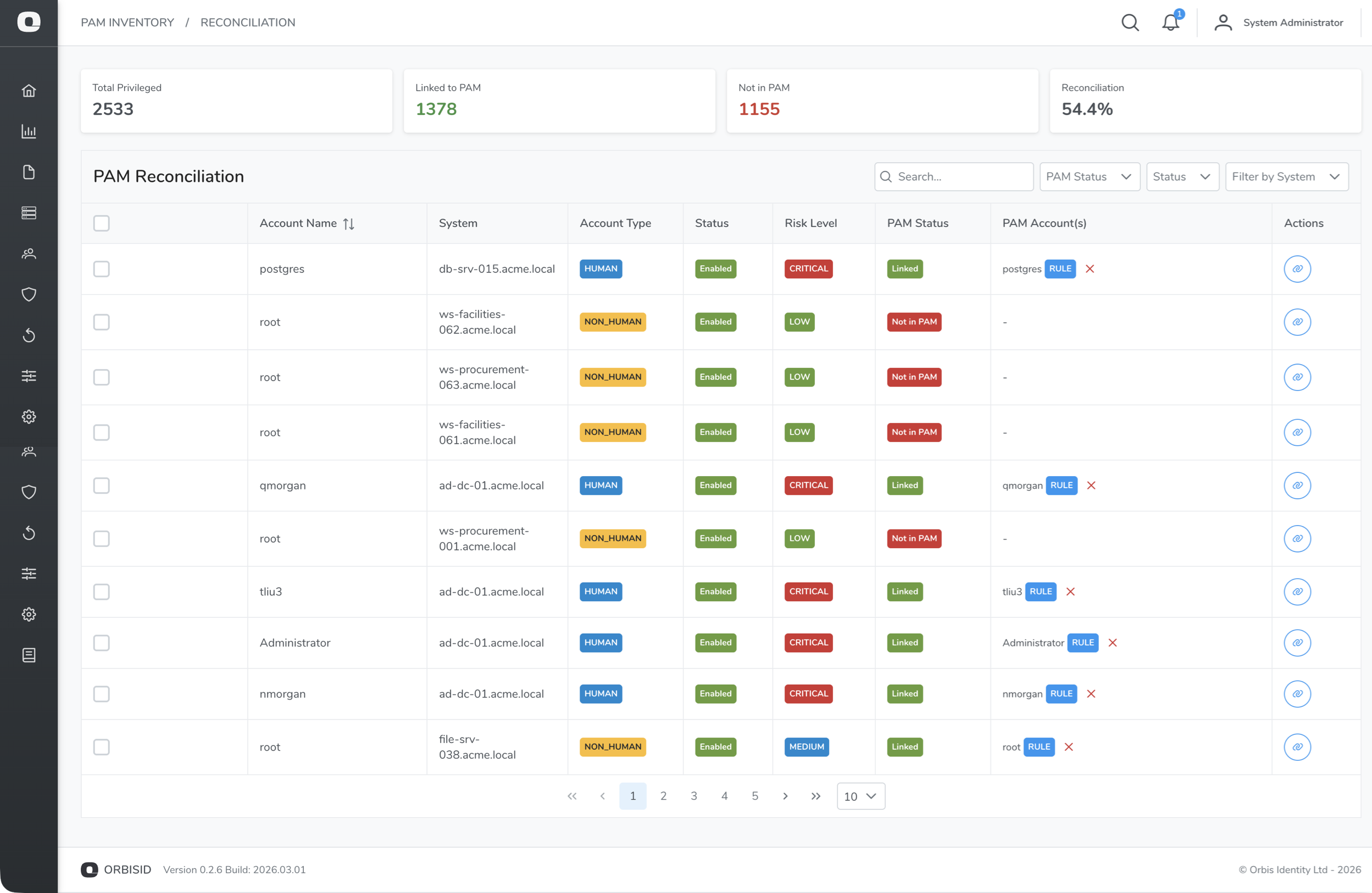
Navigate to PAM Inventory > Reconciliation to compare your PAM inventory against discovered accounts.
Running Reconciliation
- Click Run Reconciliation
- OrbisID compares every discovered privileged account against the PAM inventory
- Results are categorised into statuses (see below)
Reconciliation Statuses
| Status | Meaning | Action Required |
|---|---|---|
| Matched | The discovered account has a corresponding PAM account | None - account is managed |
| Unmanaged | The discovered account is privileged but has no PAM account | Onboard to PAM tool |
| PAM Only | The PAM account exists but no matching account was discovered | Investigate - may be stale |
| Excluded | Manually excluded from reconciliation | Review periodically |
Understanding the Results
Linking PAM Accounts
Sometimes a discovered account and a PAM account don't match automatically because of naming differences (e.g., DOMAIN\admin vs admin@domain.com). You can manually link them:
- Find an unmatched account
- Click Link
- Search for the corresponding PAM account
- Confirm the link
Bulk linking is also available for linking multiple accounts at once.
Excluding Accounts
To exclude an account from reconciliation (e.g., a known exception):
- Select the account
- Click Exclude
Excluded accounts will not appear as "Unmanaged" in future reconciliation runs.